Vibe coding has exploded onto the scene in 2026 as the ultimate shortcut for busy entrepreneurs who want powerful business tools without months of development or expensive developers. This revolutionary approach lets you describe exactly what you need in plain English, and AI handles the rest — turning vague ideas into fully functional apps in under sixty minutes. No coding experience required. Just clear prompts, quick iterations, and instant deployment.
The term “vibe coding,” popularized by AI pioneer Andrej Karpathy, captures the relaxed yet productive flow where you focus on the business outcome while AI writes, refines, and debugs the code. Platforms like Cursor, Lovable.dev, Bolt.new, Replit, and v0.dev make it possible for non-technical founders to launch MVPs, automate workflows, and scale operations faster than ever before.

In today’s fast-moving economy, time is the most valuable resource. Traditional software development can drag on for weeks or cost thousands. Vibe coding collapses that timeline dramatically. You simply open an AI-powered builder, chat your vision, watch the code appear, test it live, and ship. Many founders now build revenue-generating tools the same afternoon they have the idea.
These five practical business tools prove just how accessible and powerful the method has become. Each one solves a real pain point, runs on modern web standards, and can be completed in under an hour using free or low-cost AI platforms. Whether you run an e-commerce store, consultancy, or service business, these ready-to-customize solutions deliver immediate ROI.
Tool 1: AI Lead Qualifier Chatbot That Scores Prospects Instantly
Every business struggles with lead quality. Sales teams waste hours chasing unqualified prospects while hot leads slip away. This revolutionary chatbot changes the game by engaging website visitors in natural conversation, asking smart questions, scoring their readiness, and automatically routing high-potential leads to your inbox or CRM.
Imagine a friendly AI agent that greets visitors, discovers their budget and timeline, then assigns a lead score from 1 to 100. Qualified leads trigger instant Slack or email alerts with full conversation transcripts. The entire tool lives on your website as a sleek popup or dedicated page.
To vibe code this in under an hour, open Lovable.dev or Cursor and start with a clear prompt: “Build a full-stack web app with a modern chatbot interface using React and Node.js. The bot should ask five questions about business needs, budget, and timeline, calculate a lead score, store results in a database, and send high-scoring leads via email with full chat history.”
The AI generates the complete frontend, backend logic, and even basic authentication. Spend the next twenty minutes refining the questions to match your industry vibe — friendly for coaches, professional for B2B services. Test with sample conversations, then deploy with one click to Vercel or Netlify. Total time: 45 minutes.
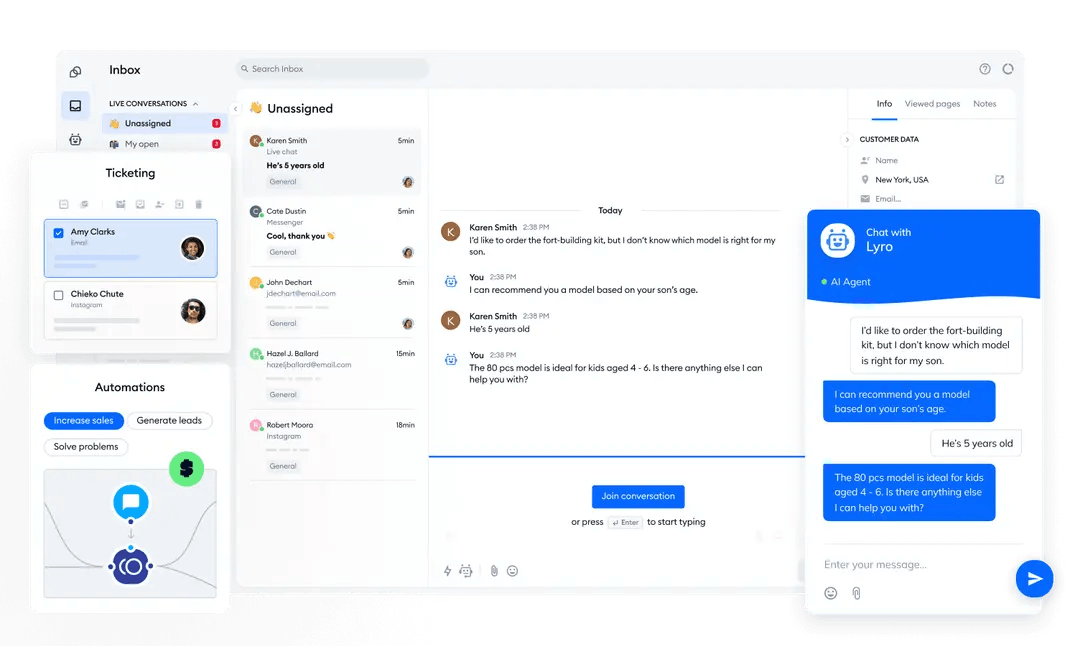
Business owners who have built this report 30-40 percent higher conversion rates because the chatbot works 24/7, never sleeps, and qualifies leads before a human ever gets involved. Add Stripe integration in an extra ten minutes if you want to capture payments from ultra-hot prospects on the spot.
Tool 2: Automated Expense Tracker With Real-Time Insights and Reports
Expense tracking eats up valuable hours every month for freelancers and small teams. Receipts get lost, categories mix up, and tax time becomes a nightmare. This smart tracker lets users snap photos of receipts, auto-categorizes them with AI, generates beautiful reports, and even flags unusual spending patterns.
The dashboard shows spending by category, monthly trends, and budget alerts in clean charts. Users can export CSV or PDF reports with one click, perfect for accountants or tax filings. Mobile responsiveness ensures it works on phones during travel.
Vibe code it by prompting Cursor or Bolt.new: “Create a SaaS-style expense tracker app with user login, receipt upload via camera or file, AI categorization using simple keywords, interactive charts with Chart.js, and PDF export. Use Supabase for the database and Tailwind for styling.”
The AI delivers a polished interface and backend in minutes. Customize the categories to match your business — marketing, travel, software — and add your logo for a branded feel. Connect it to email for weekly summaries. Most users finish the core version in 35 minutes and spend the rest tweaking the AI categorization rules for higher accuracy.
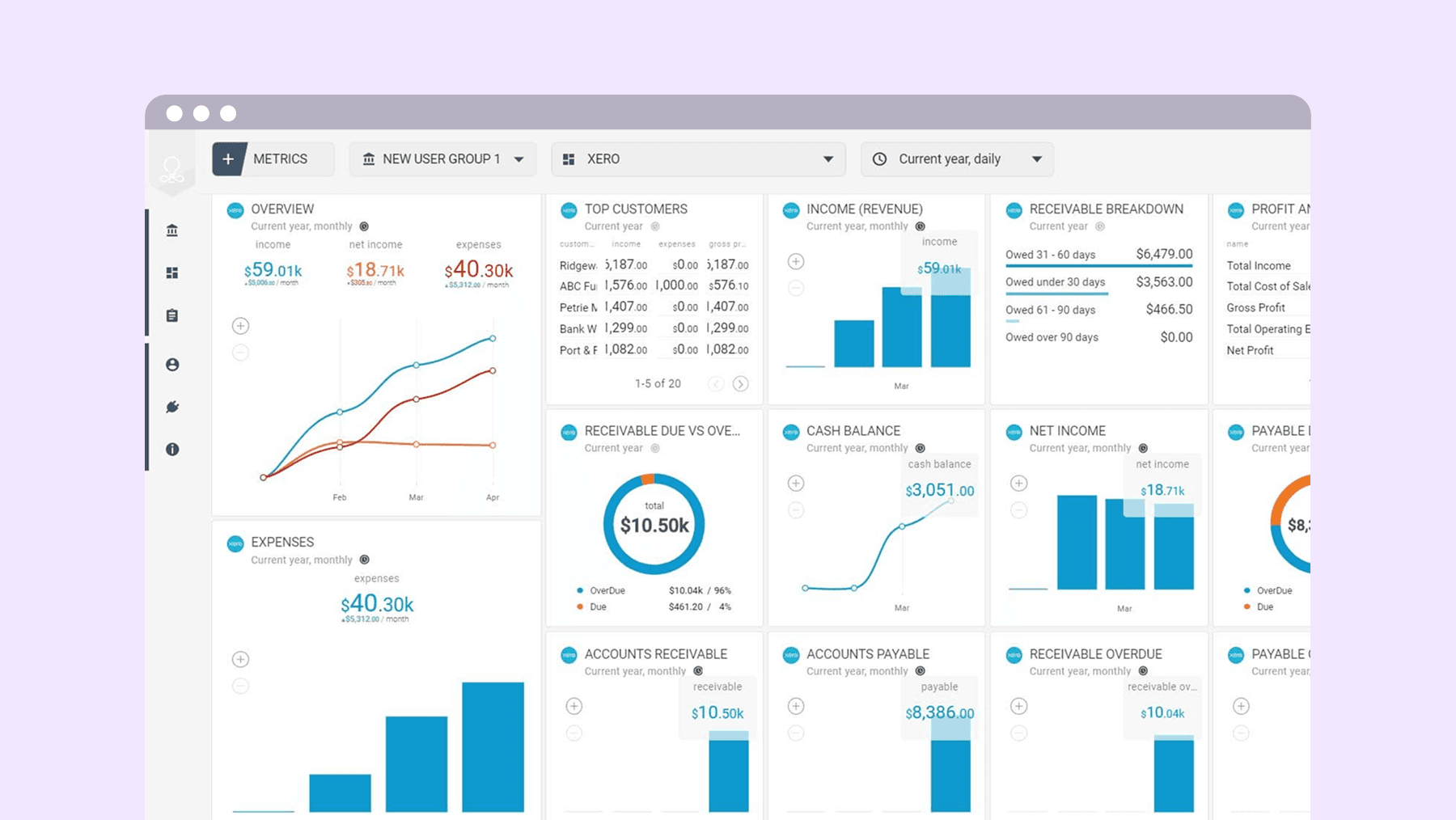
Teams using similar tools cut monthly bookkeeping time by 70 percent. The real-time insights also help spot cost leaks early, turning a reactive chore into proactive financial control.
Tool 3: Dynamic Pricing Calculator That Closes Deals Faster
Pricing confusion kills conversions. Customers want to know exact costs before committing, yet manual quotes take days. This interactive calculator lets visitors input their needs — number of users, features, or project scope — and instantly see personalized pricing with clear breakdowns and optional add-ons.
For service businesses, consultants, or SaaS companies, it feels like a live quote engine. The tool updates totals in real time, suggests bundles, and includes a “Book a Call” button that pre-fills the inquiry form with calculated details.
Start vibe coding with this prompt in Replit or v0.dev: “Build an interactive pricing calculator web app with sliders for quantity, dropdowns for packages, real-time total updates, and a lead capture form that emails the quote. Make it mobile-friendly with clean Tailwind design and include a dark mode option.”
AI generates the math logic, animations, and form handling almost instantly. Adjust the pricing tiers to reflect your actual packages and add conditional logic like “free setup for annual plans.” The whole process takes about 40 minutes, including testing different scenarios.
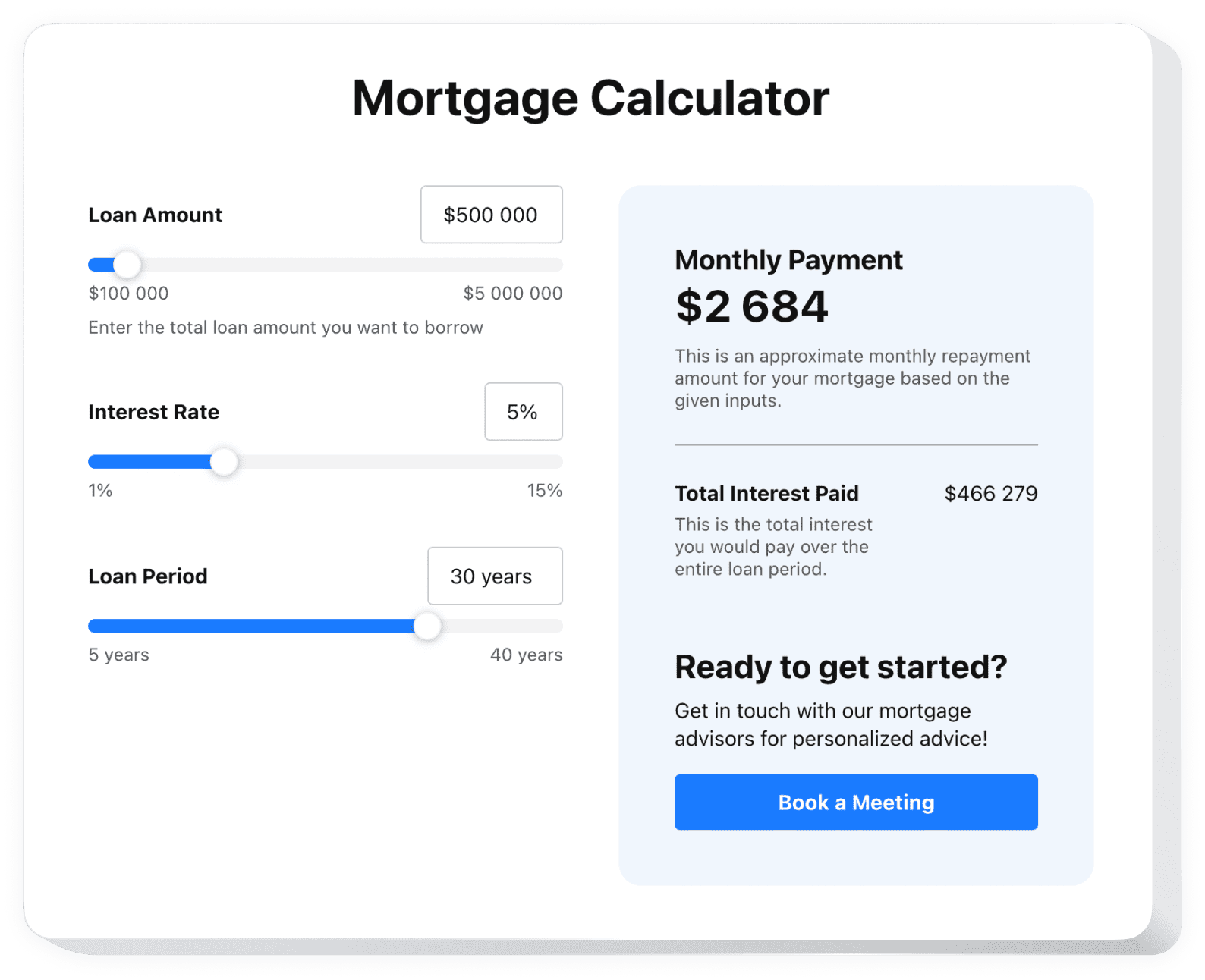
Businesses embedding this on their sites report 25 percent more quote requests because visitors see transparent pricing and feel in control. The tool also collects valuable data on popular configurations to inform future product decisions.
Tool 4: Social Media Content Scheduler With AI Suggestions
Consistent posting drives growth, yet most small businesses fall behind because planning takes too much time. This scheduler connects to major platforms, lets you draft posts with AI help, preview how they’ll look, and queue them for automatic publishing at optimal times.
The dashboard shows a clean calendar view, suggests captions based on your brand voice, and analyzes past performance to recommend better posting windows. Users upload images or videos once and reuse them across networks.
Prompt Lovable or Cursor like this: “Build a social media scheduler with calendar interface, AI caption generator, multi-platform preview, and scheduled posting simulation. Include a simple database to store drafts and analytics summary page using placeholder data.”
Within 50 minutes you’ll have a working prototype. Refine the AI prompt templates to match your tone — motivational for fitness brands, professional for lawyers — and add your social accounts for real testing. Many founders extend this into a full content calendar in the final ten minutes.

Users save hours every week and maintain steady engagement. The built-in AI suggestions often spark better ideas than staring at a blank screen.
Tool 5: Real-Time Business Analytics Dashboard for Instant Decisions
Gut feelings are great, but data drives smart moves. This dashboard pulls key metrics — sales, website traffic, expenses, leads — into one beautiful screen with live updates, trend charts, and goal trackers. Perfect for solo founders or growing teams who need clarity at a glance.
Filters let you view daily, weekly, or monthly views. Color-coded alerts highlight when metrics drop below targets. Export options make sharing with investors or partners effortless.
Vibe code prompt example: “Create a responsive analytics dashboard app with multiple charts using Chart.js, live updating cards for KPIs, goal progress bars, and dark/light theme toggle. Connect to placeholder API data and include a sidebar navigation.”
The AI assembles everything rapidly. Spend the remaining time connecting your actual data sources via simple APIs or CSV uploads. Total build time stays comfortably under 55 minutes.

Owners who deploy this dashboard make faster pivots and feel more confident presenting numbers to stakeholders. The visual clarity alone reduces decision fatigue dramatically.
Getting Started With Vibe Coding Today
The beauty of these tools lies in their flexibility. Start with any platform mentioned — most offer free tiers generous enough for prototypes. Sign up, pick one idea from the list, copy a starter prompt, and watch the magic happen. Iterate by telling the AI “make the colors more professional” or “add user authentication with Google login.” Each change takes seconds.
Security and data privacy matter. Use established hosting like Vercel or Supabase, enable basic authentication, and never store sensitive customer data until you add proper encryption. For production use, many founders spend an extra hour adding Stripe payments or Zapier integrations to connect tools together.
Scaling is surprisingly simple too. Once the core works, you can expand features — multi-user support, custom domains, advanced AI — without starting from scratch. Several solo founders have turned these one-hour projects into paid SaaS products generating thousands monthly.
The Explosive Impact on Your Business
Vibe coding removes the biggest barrier most entrepreneurs face: technical limitations. You no longer need to wait for developers, pay high fees, or compromise on features. Instead, you prototype, test with real customers, and refine based on feedback within the same day.
The five tools above cover the most common bottlenecks — leads, expenses, pricing, content, and insights. Implement even two of them and watch productivity soar while overhead drops. Many users report reclaiming 10-15 hours per week that used to disappear into manual work.
As AI platforms continue improving through 2026, expect even richer capabilities: voice prompts, automatic testing, and one-click marketplace deployment. The founders who embrace vibe coding now position themselves far ahead of competitors still stuck in traditional workflows.
Ready to experience the revolution? Open your favorite vibe coding platform, pick your first tool from this list, and start describing the exact solution your business needs. In under an hour you’ll have something working that you can show customers, test live, and improve tomorrow. The explosive growth that follows comes from action, not waiting.
This approach levels the playing field for small businesses everywhere. What once required teams and budgets now needs only your vision and a few well-chosen words. The future of entrepreneurship is faster, smarter, and far more accessible — and it starts with these five revolutionary tools you can vibe code today.
Discover more from TECH-BRUNCH
Subscribe to get the latest posts sent to your email.