In the fast-evolving world of technology, Microsoft’s aggressive push into artificial intelligence has sparked heated debates among users and industry watchers alike. As of April 2026, one provocative claim stands out: the tech giant appears to be sacrificing its once-promising browser, Microsoft Edge, on the altar of Copilot. What began as a smart integration of AI features has morphed into something far more transformative—and controversial. Edge, rebuilt on Chromium in 2020 and praised for its speed, efficiency, and privacy tools, now feels increasingly like a vessel for Copilot rather than a standalone browser experience.
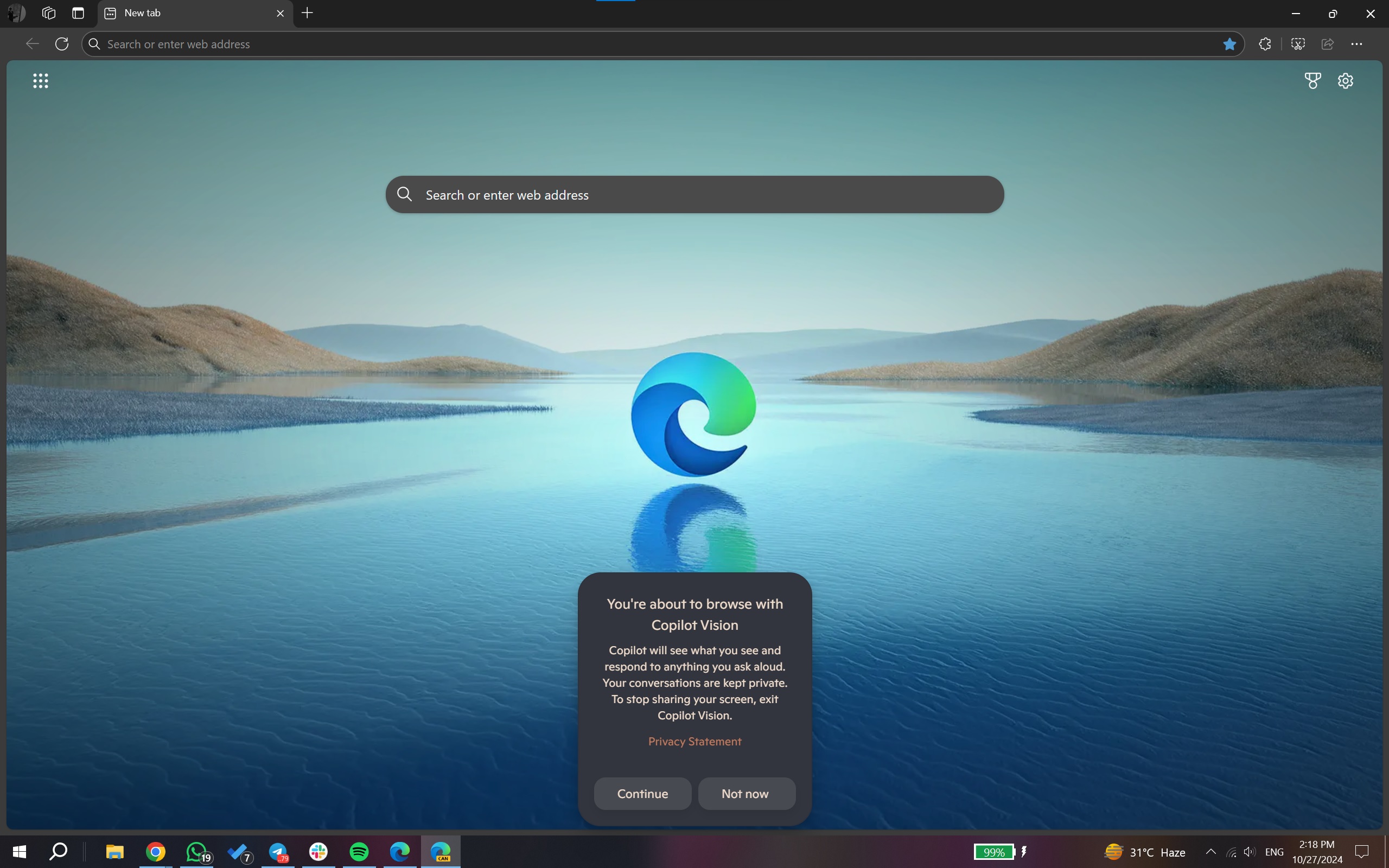
This shift isn’t subtle. From default Copilot-dominated new tab pages to force-installed AI companions via Edge updates, Microsoft’s strategy prioritizes ecosystem lock-in over traditional browsing. While Copilot promises productivity gains, many users report frustration with an interface that hijacks core browser functions. This article dives deep into the evidence, exploring seven shocking signs of this transformation, its implications for everyday users, and what it means for the future of web browsing. With Edge’s desktop market share hovering at just 12.9 percent in March 2026 compared to Chrome’s dominant 69.4 percent, the stakes couldn’t be higher.
Microsoft’s ambitions extend beyond browsers. By funneling searches, chats, and even PDF interactions through Copilot, the company aims to build a unified AI powerhouse. Yet critics argue this comes at the expense of Edge’s identity as a clean, user-friendly alternative to Google’s offerings. Let’s unpack the details step by step, examining how these changes unfolded and why they matter.
The Evolution of Edge: From Challenger to Copilot Companion
Microsoft Edge’s journey reflects the company’s broader pivot toward AI. Launched as a modern replacement for Internet Explorer, Edge gained traction post-2020 by adopting Chromium, delivering faster performance and better compatibility than its predecessor. Features like vertical tabs, Collections, and built-in privacy controls helped it carve out a niche. For a time, it felt like a genuine competitor to Chrome—lighter on resources and packed with thoughtful extras.
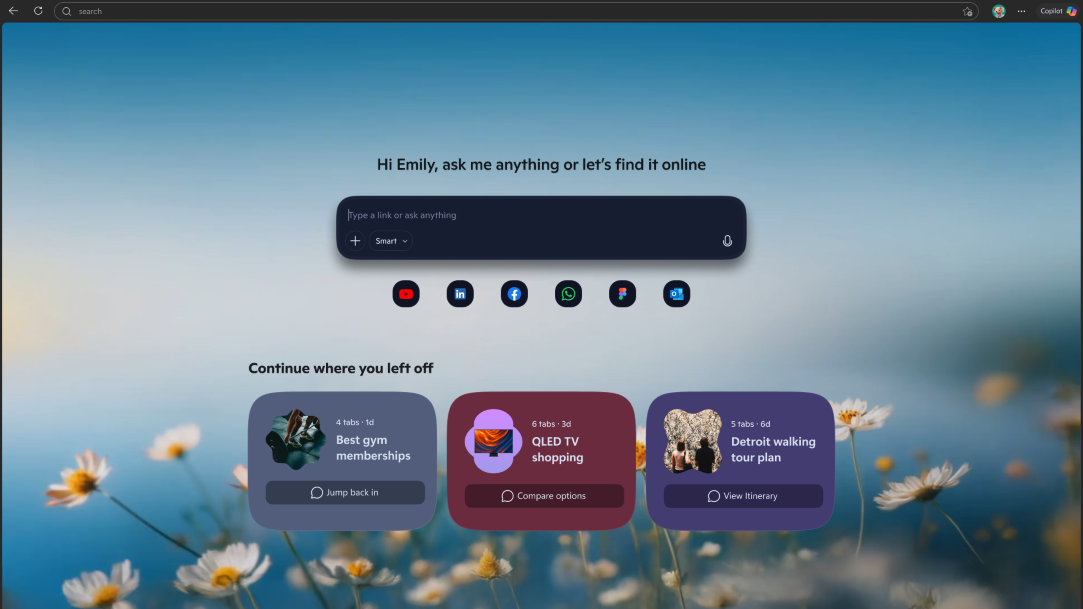
Fast-forward to 2026, and the narrative has shifted dramatically. Copilot, Microsoft’s flagship AI assistant powered by advanced models from its OpenAI partnership, now permeates every corner of Edge. What started as a sidebar chat tool has evolved into a full-fledged mode that redefines the browser’s startup experience. Users launching Edge often land directly in a Copilot interface, complete with chat history on the left and a prominent compose box front and center. This isn’t optional by default; it’s the new normal, turning what should be a neutral entry point into an AI-first dashboard.
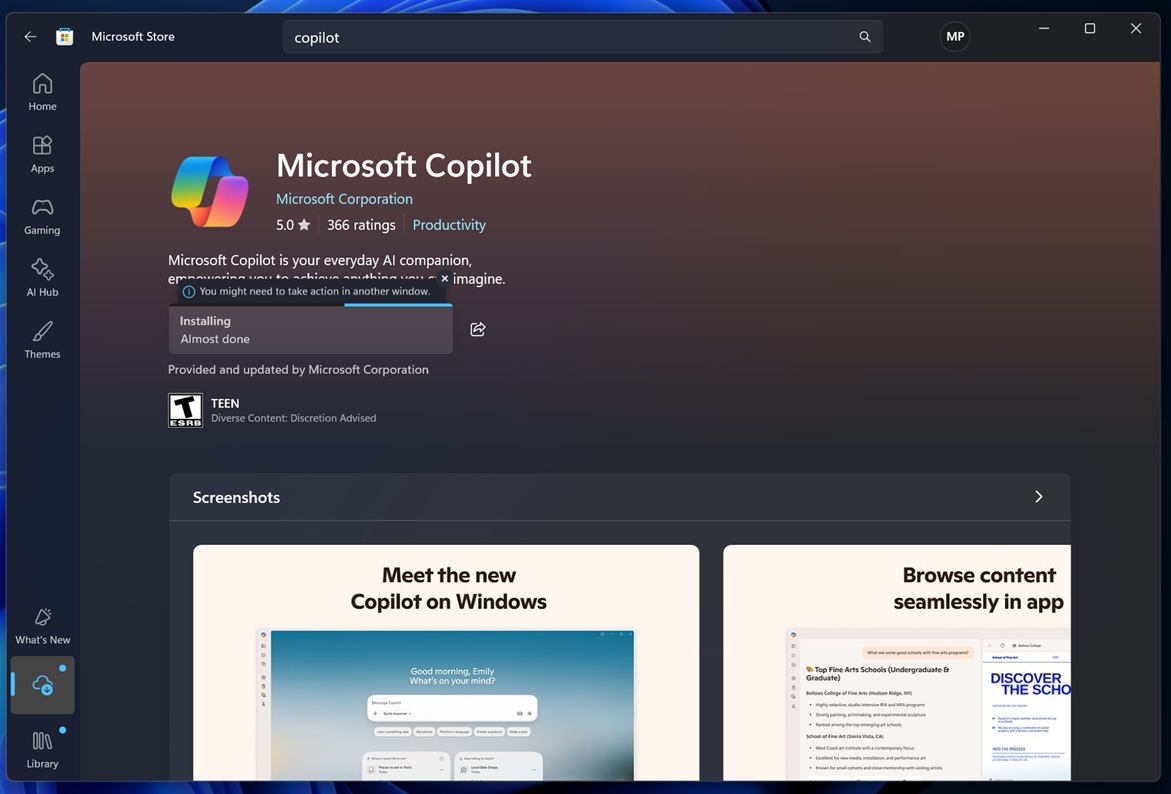
Recent updates underscore this integration. In early April 2026, Edge’s self-updating mechanism quietly installed the standalone Copilot app on multiple Windows 11 systems, consuming over 825MB of storage without user consent. Event logs tied the rollout directly to Edge version 146.0.3856.97, revealing how the browser now doubles as an AI delivery system. These moves aren’t isolated experiments—they signal a deliberate strategy to blur the lines between browser and AI companion.
Sign 1: The New Tab Page Becomes Copilot Central
One of the most visible changes hits right at launch. Previously, Edge’s new tab page offered a clean address bar, customizable shortcuts, and serene wallpapers for a focused start. Today, it launches a full Copilot UI by default, complete with suggested actions, image generation tools, and contextual prompts. The address bar itself sometimes redirects queries straight to Copilot, inserting URLs into chat boxes instead of loading pages directly—an intermittent quirk that disrupts muscle memory for millions.
This overhaul, rolled out progressively through 2025 and solidified in 2026 previews, prioritizes AI interaction over browsing basics. Microsoft once described Copilot Mode as optional, yet it now activates automatically for most users. The result? A browser that feels less like a window to the web and more like an entry to Microsoft’s AI ecosystem. Productivity enthusiasts appreciate quick summaries and image creation, but casual users lament the loss of simplicity.
Sign 2: UI Redesign Mirrors the Copilot App
Edge’s interface is undergoing a subtle but profound makeover in Canary and Dev channels as of January 2026. Rounder corners, matching color palettes, and font styles now echo the standalone Copilot app, abandoning elements of Microsoft’s signature Fluent Design. Settings menus, context menus, and dropdowns align with Copilot’s aesthetic, creating a cohesive—but homogenized—experience across AI products.
This redesign isn’t cosmetic alone. It signals deeper architectural ties, with the new Copilot app for Windows 11 essentially wrapping a full Edge instance. Users launching Copilot from the Start menu interact with a web-based shell that mirrors Edge’s core, blurring distinctions further. While unified design aids consistency, it risks diluting Edge’s unique browser personality in favor of AI branding.
Sign 3: Force-Installed Copilot via Edge Updates
Perhaps the most aggressive tactic emerged in April 2026. During routine Edge updates, the Copilot desktop application appeared unprompted on Windows 11 Pro systems. No Microsoft Store notification flagged the change; it simply materialized in Program Files, courtesy of Edge’s self-updater. This 825MB payload arrived alongside browser version bumps, effectively turning Edge into a Trojan horse for AI software.
Such behavior echoes Microsoft’s 1990s bundling controversies with Internet Explorer, though today’s focus is data and ecosystem dominance rather than antitrust evasion. Searches and interactions feed into Copilot’s learning models, strengthening Microsoft’s AI offerings while users browse.
Sign 4: Auto-Launching Copilot Panes Across Apps
Edge doesn’t stop at its own window. Starting in May 2026, opening Outlook links will automatically trigger the Copilot sidebar in Edge, delivering contextual insights and suggestion chips based on email content. This deep integration extends to Teams chats, PDF readers with new Summarize and Explain actions, and even YouTube videos via the side pane.
While convenient for power users, it transforms Edge into a persistent AI overlay. Traditional browsing takes a backseat as Copilot intervenes proactively, sometimes overwhelming the core experience.
Sign 5: Eroding Unique Browser Features
As Copilot expands, Edge sheds distinctive tools that once set it apart. The sidebar and Collections feature have been de-emphasized or removed in recent builds, with right-click menus streamlined to resemble Chrome’s. Vertical tabs remain, but the overall identity erodes under AI layers. Microsoft justifies this as simplification, yet users sense a sacrifice of browser excellence for AI hype.
Sign 6: User Frustration Fuels Linux Migration
Backlash is mounting. Forums and social discussions highlight annoyance with intrusive prompts, default AI takeovers, and perceived bloat. Power users, developers, and gamers—key demographics—report switching to Linux distributions like Ubuntu or Fedora, where Edge installs optionally without coercion. Linux desktop share hit a record 9.52 percent globally by early 2026, more than doubling in recent years, partly attributed to Windows clutter and forced AI.

One Reddit user summed up the sentiment: the Copilot prompt feels “garbage” and outdated, wasting time rather than enhancing it. Such feedback risks alienating Microsoft’s most loyal base.
Sign 7: Strategic Pivot to AI Lock-In Over Browser Competition
At its core, these changes serve Microsoft’s AI ambitions. Edge funnels traffic to Bing and Copilot, generating data for model training and ad revenue. With Google’s Gemini and Apple’s AI advancing, the company bets on ecosystem dominance. Billions invested in OpenAI underscore this priority—browsers become conduits, not destinations.

Yet this risks short-term pain. Market share stagnates despite technical superiority, and trust erodes as users feel manipulated rather than empowered.
Balancing Innovation with User Choice
Not all changes are negative. Copilot in Edge excels at summarizing websites, drafting content with citations, and handling PDFs seamlessly. Agent mode in Office apps and contextual grounding across tabs boost productivity for licensed users. Enterprise controls allow admins to manage these features, and individuals can toggle Copilot Mode in Settings under AI innovations.
For those seeking relief, disabling options exist—though complete removal of background AI requests remains elusive. Microsoft’s roadmap hints at further refinements, including cleaner experiences and user-controlled prompts.
The Road Ahead: Browser or AI Platform?
Looking forward, Edge’s fate hinges on execution. If Copilot delivers transformative value without alienating users, adoption could surge. Yet persistent coercion may accelerate shifts to Chrome, Firefox, or even Linux. Microsoft must tread carefully to avoid repeating past antitrust pitfalls while innovating responsibly.
Analysts predict continued integration, with Copilot Vision and advanced agents expanding across platforms. The new Copilot app’s Edge foundation suggests convergence, where browsers evolve into intelligent agents rather than passive windows.
For now, the signs are clear: Microsoft prioritizes Copilot’s ascent, reshaping Edge in its image. Users face a choice—embrace the AI future or seek alternatives. As the browser wars intensify, one truth emerges: innovation thrives when it respects user agency, not when it demands it.
In conclusion, the seven signs outlined here paint a picture of bold ambition tempered by growing pains. Microsoft’s vision for an AI-powered web is ambitious, but sacrificing Edge’s core strengths could backfire if not balanced thoughtfully. Tech enthusiasts, businesses, and everyday surfers alike will watch closely as this saga unfolds through 2026 and beyond. Will Copilot elevate Edge to new heights, or will the sacrifice prove too costly? Only time—and user feedback—will tell.
Discover more from TECH-BRUNCH
Subscribe to get the latest posts sent to your email.