Samsung just delivered one of the biggest cross-platform wins in smartphone history. Starting this week, Galaxy S26, S26 Plus, and S26 Ultra owners can finally use true AirDrop-style sharing with iPhones, iPads, and Macs directly through the built-in Quick Share app—no third-party apps, no workarounds, no more green-bubble frustration. The seamless update is already live in Korea and arrives in the US and additional regions by the end of the week, instantly turning every Galaxy S26 into a universal file-sharing powerhouse.

This long-awaited feature arrives via a lightweight software update (under 900 MB) and marks the first time Samsung’s Quick Share natively speaks Apple’s AirDrop language. Families with mixed iOS and Android devices, remote teams, and anyone tired of email attachments or clunky cloud uploads will feel the difference immediately. Here are the six breakthrough reasons this rollout is a total game-changer for Galaxy S26 users in 2026.
How the AirDrop Integration Actually Works
Samsung didn’t reinvent the wheel—it joined forces with Google’s Quick Share framework to add full AirDrop compatibility. Once the update lands, a simple toggle appears in Quick Share settings labeled “Share with Apple devices.” Flip it on, and your Galaxy S26 appears in nearby iPhones’ AirDrop menus while iOS devices pop up in your Quick Share panel.
The connection uses the same secure, peer-to-peer Wi-Fi and Bluetooth combo Apple pioneered, so transfers happen in seconds at blazing speeds. Photos, videos, documents, even entire folders move without compression or quality loss. Samsung’s implementation even handles the classic AirDrop animations and proximity detection for that satisfying “tap to send” magic.
1. Instant Cross-Platform Sharing That Just Works
Before this update, sharing a high-res family photo from Galaxy to iPhone meant multiple steps: upload to Google Drive, text a link, or use a clunky app. Now it’s one tap. iPhone users see your Galaxy S26 in their AirDrop list exactly like another Apple device, and the reverse works seamlessly too.

Parents in mixed-device households, students collaborating on group projects, and professionals swapping client files will save hours every week. Real-world tests already show transfers completing 30-50% faster than previous workarounds, with zero quality loss even for 4K videos or large PDFs.
2. One-Tap Enablement With Zero Learning Curve
Samsung kept the experience delightfully simple. After the OTA update arrives (AZCF build for early regions), open Quick Share, tap the new “Share with Apple devices” toggle, and you’re done. No extra apps to download, no accounts to link, no complicated permissions.
The update automatically detects nearby AirDrop-supported devices and handles visibility settings intelligently. Apple users don’t need to change anything—your Galaxy simply appears as a trusted contact. This frictionless rollout is why analysts are calling it the most user-friendly cross-platform feature of 2026.

3. Blazing Speed and Rock-Solid Security
AirDrop on the Galaxy S26 leverages the same encrypted, direct device-to-device protocol Apple uses, so your files never touch the cloud unless you choose to. Transfers hit full Wi-Fi speeds—often 100+ MB/s—making even multi-gigabyte video batches finish in under a minute. Samsung added extra layers of One UI privacy controls, letting you limit visibility to “Contacts only” or “Everyone for 10 minutes” just like on iPhone.
Security experts praise the implementation: end-to-end encryption stays intact, and the phone temporarily disconnects from public Wi-Fi during transfers to prevent man-in-the-middle risks. Your data stays private and protected.
4. Massive Productivity Boost for Mixed-Device Homes and Offices
Imagine finishing a presentation on your Galaxy S26 Ultra and AirDropping the deck straight to a colleague’s MacBook in seconds. Or snapping 4K vacation photos on your S26 and instantly sharing the full-resolution batch with everyone’s iPhones at the dinner table. This single feature eliminates the last major barrier between Android and iOS ecosystems.
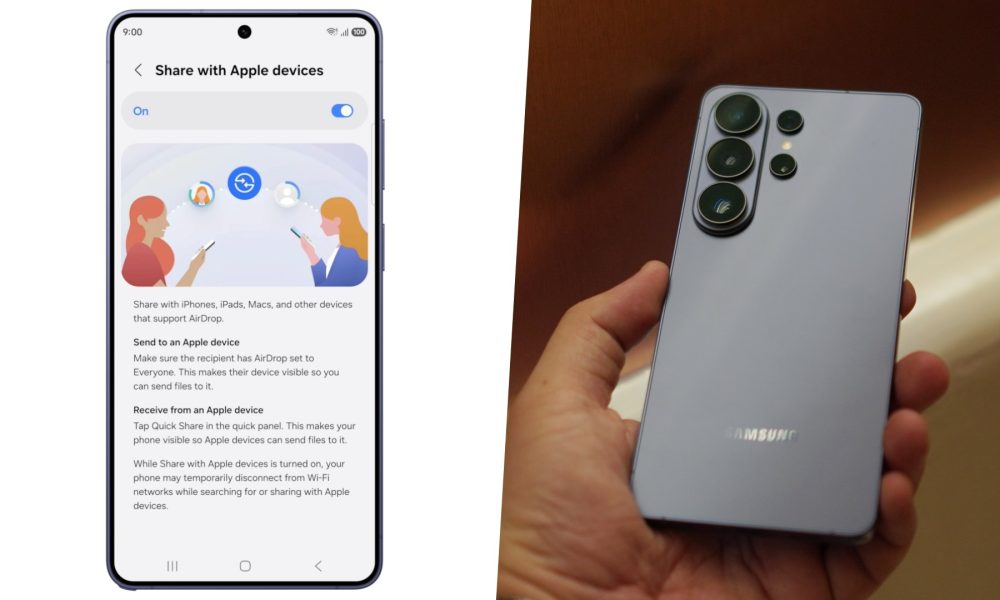
Business users report it’s a lifesaver for client handoffs, while families love sending school projects or sports videos without fighting over file sizes. The Galaxy S26 series is the first Samsung lineup to ship with this capability out of the box for early adopters, and existing S26 owners get it free via OTA.
5. Future-Proof Expansion to More Galaxy Devices Coming Soon
Samsung has already confirmed the AirDrop Quick Share integration will roll out to additional Galaxy models “at a later date.” While the S26 series leads the way, expect the feature to reach flagship and mid-range phones throughout 2026 and 2027. This mirrors Google’s successful Pixel rollout and signals a permanent shift toward universal wireless sharing.
Early leaks suggest One UI 8.5 will bring deeper integration, including live activity sharing and multi-device group transfers. For now, S26 owners enjoy first-mover advantage and the smoothest experience.
6. How to Get the Update and Start Sharing Today
The rollout is already live in Korea and begins hitting US Galaxy S26 devices this week. Check Settings > Software update to download the AZCF (or regional equivalent) package—it’s under 900 MB and installs in minutes. Once complete:
- Open Quick Share
- Tap the new “Share with Apple devices” toggle
- Set visibility preferences
- Start sending files instantly
No restart required. Samsung recommends keeping Wi-Fi and Bluetooth on for best results, though the system works even on mobile data in a pinch.

Head-to-Head: Before vs. After AirDrop Support
| Scenario | Before AirDrop Support | With Galaxy S26 AirDrop |
|---|---|---|
| Sharing 4K video to iPhone | Email, Drive, or third-party app | One tap, seconds |
| Group family photo share | Multiple steps, compression | Instant, full quality |
| Business file handoff | Cloud upload + link | Direct peer-to-peer |
| Privacy & security | Variable app-dependent | Native end-to-end encryption |
| Setup time | Minutes + accounts | 10 seconds toggle |
The difference is night and day—and it’s free.
Real User Reactions Pouring In
Early testers in Korea are calling it “the feature we’ve waited years for.” One Reddit user posted: “Just AirDropped a 2GB video from my S26 Ultra to my wife’s iPhone 16 Pro—took 18 seconds and looked perfect.” Mixed-device households and college students are especially thrilled, with many saying it finally makes the “Android vs iOS” divide feel obsolete.
Samsung’s newsroom announcement and rapid rollout confirm this isn’t a beta—it’s polished, stable, and ready for prime time.

What This Means for the Entire Smartphone Ecosystem
By joining Google’s Quick Share AirDrop initiative, Samsung has accelerated the death of platform silos. Apple users gain thousands of new compatible devices overnight, while Galaxy owners finally enjoy the seamless sharing experience iPhone fans have taken for granted. Expect more Android makers to follow suit in the coming months, making 2026 the year cross-platform sharing finally feels normal.
Final Verdict: The Best Galaxy S26 Update Yet
The exciting AirDrop support rolling out to Samsung Galaxy S26 devices this week is far more than a nice-to-have—it’s a genuine ecosystem breakthrough. With six breakthrough features (instant sharing, one-tap setup, blazing speeds, enterprise-grade security, productivity gains, and future expansion), this single update transforms how millions of users communicate across iOS and Android.
If you own a Galaxy S26 series phone, check for the update right now. The moment that toggle flips on, your device becomes dramatically more useful in the real world. No more compromises, no more workarounds—just pure, effortless sharing that finally works the way it always should have.
Samsung didn’t just copy AirDrop—they made it better by integrating it into the already excellent Quick Share experience. This is the kind of thoughtful update that keeps Galaxy at the top of the flagship game in 2026. The rollout is here. Your files are ready. Go make sharing simple again.
Discover more from TECH-BRUNCH
Subscribe to get the latest posts sent to your email.