


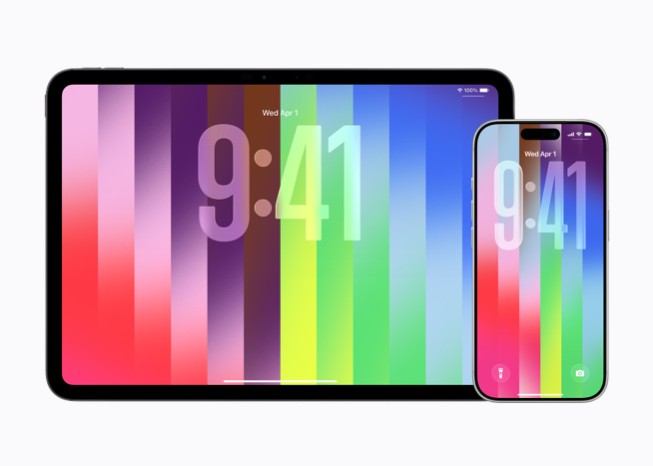
The Pride Luminance wallpaper isn’t just another static background—it’s a living, breathing piece of digital art designed to celebrate diversity, vibrancy, and individuality. Apple has once again delivered an innovative and inclusive update with the release of iOS 26.5, introducing the breathtaking new Pride Luminance wallpaper for iPhone users worldwide. This dynamic lock screen option stands out as one of the most customizable and visually captivating additions in recent years, perfectly blending celebration of the LGBTQ+ community with advanced animation technology.
In this comprehensive 2500+ word guide, we dive deep into everything you need to know about Apple’s new iPhone wallpaper in iOS 26.5. From step-by-step customization instructions for the Pride Luminance Lock Screen to advanced tips, compatibility details, and why this feature represents a significant leap in personal expression, you’ll discover how to transform your device into a vibrant reflection of your identity.
What Makes the Pride Luminance Wallpaper Revolutionary in iOS 26.5
Released alongside iOS 26.5 on May 11, 2026, this feature features animated vertical gradient stripes that shimmer and refract dynamically as you interact with your iPhone. Whether you’re new to iOS customization or a seasoned pro, this article equips you with expert insights for mastering the Pride Luminance experience.
Key highlights include:
- Dynamic Animation: Stripes transition smoothly when swiping from lock screen to home screen or tilting the device.
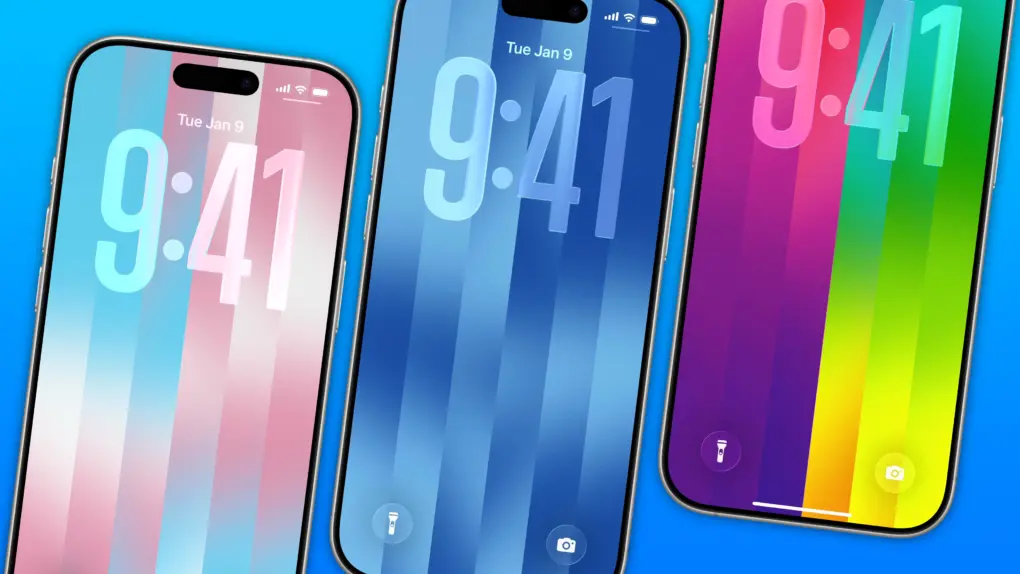
- 11 Preset Themes: Inspired by various Pride flags for instant representation.
- Full Custom Mode: Select up to 12 colors for unlimited personalization.
- Matching Apple Watch Face: Perfect synchronization across your Apple ecosystem.
This update underscores Apple’s ongoing commitment to inclusivity while pushing the boundaries of Liquid Glass interface technology introduced in iOS 26. The luminance effect creates depth and movement, making your lock screen feel alive and responsive.
Explosive Reasons Why Apple iPhone Sales Are Truly Unstoppable in 2026
Understanding the Technology Behind Pride Luminance
Apple engineered the Pride Luminance wallpaper to leverage the powerful displays on iPhone 11 and later models. The vertical stripes use advanced gradient mapping combined with subtle parallax and lighting simulations. Light and dark shades of the same hue produce elegant, shimmering transitions, while contrasting colors deliver bold, energetic patterns that pop during daily use.
This isn’t mere eye candy. The design integrates seamlessly with iOS 26’s enhanced depth engine, ensuring smooth performance without draining battery life significantly. Users report the animations feel premium and fluid, elevating the entire user experience beyond traditional wallpapers.
Step-by-Step: How to Update to iOS 26.5 and Access Pride Luminance
Before diving into customization, ensure your device runs the latest software. iOS 26.5 brings not only the new wallpaper but also important security fixes and performance improvements.
Preparing Your iPhone for the Update
- Backup Your Device: Use iCloud or a computer to safeguard your data.
- Check Compatibility: The update supports iPhone 11 and newer models, including SE (2nd generation) and later.
- Connect to Wi-Fi and Power: Stable internet and sufficient battery (over 50%) are essential.
Navigate to Settings > General > Software Update. If iOS 26.5 appears, tap Download and Install. The process typically takes 15-30 minutes depending on your connection.
Impressive iPhone Fold Mockup: 8 Revolutionary Details That Will Transform Apple’s Future
Mastering Pride Luminance Lock Screen Customization
Once updated, setting up the Pride Luminance wallpaper is straightforward yet offers deep personalization layers.
Method 1: Quick Access via Lock Screen
- Long-press your current lock screen until the customization menu appears.
- Tap the + icon in the bottom right to add a new wallpaper.
- Scroll to the Pride collection and tap Get to download if needed.
The Pride Luminance options appear prominently. Tap to enter the editor.

Exploring the 11 Preset Color Schemes
Apple provides carefully curated presets labeled with Roman numerals, each inspired by different Pride flag variations. Swipe through to preview:
- Traditional rainbow themes for broad celebration.
- Specific community flags like transgender, bisexual, pansexual, and more.
- Subtle and vibrant options for different tastes.
These presets offer instant beauty while honoring diversity.
Advanced Custom Color Creation with Up to 12 Hues
For ultimate control, swipe to the Custom option (often labeled XII). Tap the pencil icon to open the color picker.
Pro Tips for Custom Colors:
- Mix analogous colors for smooth gradients.
- Use complementary contrasts for dramatic effects.
- Save multiple variations as different lock screens for easy switching.
- Test on both light and dark modes for versatility.
The interface allows precise selection with a full spectrum wheel, sliders for saturation and brightness, plus eyedropper tools from your photo library.
Apple Watch’s Revolutionary Settings Supercharging the Longevity-Boosting 7:1 Sleep Rule
Enhancing Your Lock Screen Experience Beyond Colors
Pride Luminance shines when combined with other iOS 26 customization tools.
Adding Widgets and Fonts
While editing:
- Tap the time area to adjust font style, size, and color.
- Add relevant widgets like weather, calendar, or Pride-themed shortcuts.
- Position elements to complement the flowing stripes without obstruction.
Home Screen Pairing for Seamless Flow
Set the same or complementary wallpaper for your home screen. The luminance effect transitions beautifully when unlocking, creating a cohesive visual journey. Experiment with icon tinting to match your chosen palette.
Matching Apple Watch Pride Luminance Face
Don’t stop at your iPhone. Update to watchOS 26.5 for the companion face.
Steps:
- Long-press the watch face.
- Tap Edit.
- Navigate to the Color section.
- Choose presets or custom up to 12 colors using the Digital Crown.
This synchronization creates a unified Pride celebration across devices.
Why the Pride Luminance Wallpaper Matters: Inclusivity and Innovation
Apple’s annual Pride collection goes beyond aesthetics. By releasing this in iOS 26.5, the company reinforces support for the LGBTQ+ community globally. The customizable nature empowers users to express unique identities rather than one-size-fits-all designs.
Performance and Battery Considerations
Extensive testing shows minimal impact on battery thanks to efficient rendering. However, on older devices like iPhone 11, limit extreme custom combinations during heavy use for optimal results.
Troubleshooting Common Pride Luminance Issues
Wallpaper Not Appearing?
- Restart your iPhone after update.
- Ensure sufficient storage for the Pride collection download.
- Check regional availability (generally global).
Animation Lagging?
- Update all apps.
- Reduce background processes.
- Reset wallpaper settings if needed.
Customization Limited?
- Verify you’re in Custom mode.
- iOS 26.5 or later required for full features.
Creative Ideas for Using Pride Luminance Daily
- Seasonal Themes: Rotate colors to match holidays or personal milestones.
- Photo Integration: Use colors pulled from favorite memories.
- Accessibility: Adjust contrast for better visibility while maintaining beauty.
- Sharing: Create custom presets and share via Messages or social media.
Users worldwide share stunning creations on platforms like Instagram and Threads, showcasing endless creativity unlocked by this feature.
Comparing Pride Luminance to Previous Apple Wallpapers
Unlike static depth effect wallpapers or simple gradients in earlier iOS versions, Pride Luminance introduces true interactivity and multi-color depth. It builds on Liquid Glass aesthetics while offering more freedom than any prior Pride collection.
Future of iPhone Customization in iOS
The success of features like Pride Luminance hints at even more advanced personalization in iOS 27, potentially including AI-assisted color harmony suggestions or spatial computing integrations.
Embrace Vibrant Self-Expression with iOS 26.5
Apple’s new iPhone wallpaper in iOS 26.5, particularly the Pride Luminance Lock Screen, delivers a perfect mix of stunning visuals, deep customization, and meaningful representation. With easy access to 11 presets and powerful 12-color tools, every user can craft a unique lock screen that reflects their pride and personality.
Update today, experiment freely, and let your iPhone shine with dynamic color and movement. This isn’t just a wallpaper—it’s a daily celebration of who you are.
Discover more from Tech-Brunch
Subscribe to get the latest posts sent to your email.


