


Apple’s upcoming iOS 27 update is poised to deliver a powerful boost to mobile photography and creativity. With three innovative AI-powered tools heading to the Photos app, users can expect a transformative editing experience that rivals professional software while remaining intuitive and on-device. These advancements build on Apple Intelligence, promising faster, smarter, and more creative ways to perfect your shots.
In this comprehensive guide, we explore everything you need to know about these three standout features—Extend, Enhance, and Reframe—along with their real-world impact, technical underpinnings, compatibility details, and why they represent a major leap forward for iPhone users. Whether you’re a casual snapper, a social media influencer, or a budding photographer, iOS 27 could fundamentally change how you interact with your camera roll.
1. The Rise of Apple Intelligence in iOS 27: Setting the Stage for AI Innovation
Apple has steadily integrated artificial intelligence into its ecosystem, but iOS 27 marks a significant acceleration. The company continues refining its on-device processing capabilities to prioritize privacy while delivering impressive generative results. These new photo tools join a broader suite of AI enhancements expected in the fall 2026 release, including smarter Siri capabilities and expanded Visual Intelligence features.
The Photos app has long been a cornerstone of the iOS experience, serving millions as their primary gallery and editing hub. By embedding advanced Apple Intelligence tools directly into the editing workflow, Apple aims to close the gap with competitors like Google Photos while maintaining its signature seamless design and security focus.
Industry analysts predict these updates will drive higher user engagement with native apps and position the iPhone as an even stronger creative tool. Early reports suggest processing for these new features typically completes in just a few seconds, thanks to optimized on-device models.
“Apple is leaning heavily on artificial intelligence to better compete with Android devices.” — Bloomberg report on iOS 27 photo tools
This sentiment captures the competitive spirit driving these developments. As AI becomes table stakes in smartphones, Apple’s approach emphasizes reliability, privacy, and integration over flashy but less secure cloud-dependent alternatives.
2. Deep Dive into Extend: Generate Beyond the Frame with Intelligent Expansion
One of the most exciting additions is the Extend feature. This tool allows users to expand images beyond their original borders by intelligently generating new content that matches the scene’s style, lighting, and composition.
Imagine capturing a stunning mountain landscape but wishing for more sky or foreground detail. With Extend in iOS 27, simply drag the edges of the photo in the editor, and Apple Intelligence will fill in plausible new elements. The system analyses existing pixels to maintain consistency in textures, colours, and perspective.
How Extend Works Under the Hood
Extend leverages generative AI models trained on vast datasets while running primarily on-device for speed and privacy. It builds upon earlier Clean Up tools but takes a proactive generative approach. Users maintain full control—preview changes in real-time and undo with a tap.
Practical Use Cases for Extend:
- Expanding portraits to include more environmental context
- Fixing awkward compositions in travel photos
- Creating panoramic-like effects from standard shots
- Generating background variations for product photography
- Enhancing social media content with custom aspect ratios
This feature particularly shines for content creators who need flexibility without switching to desktop software like Photoshop. Early testers report natural-looking results that avoid common AI artifacts, thanks to Apple’s focus on contextual understanding.
Performance varies by device, with newer A-series and M-series chips delivering the fastest results. Privacy remains paramount: no images leave your device unless you explicitly opt into advanced cloud processing for complex scenes.
Experts believe Extend will reduce the need for third-party apps, streamlining workflows for everyday users. It democratizes advanced editing techniques previously reserved for professionals.
3. Enhance: Instant Professional-Quality Improvements at Your Fingertips
The second pillar of iOS 27’s photo revolution is Enhance, an AI-powered one-tap (or smart auto) tool that dramatically improves colour, lighting, contrast, and overall image quality.
While basic auto-enhance features have existed for years, this new version uses sophisticated Apple Intelligence to make context-aware adjustments. It analyses the entire scene—recognizing subjects, environments, and artistic intent—before applying optimizations.
Key Capabilities of the Enhance Tool
- Intelligent Colour Correction: Balances hues while preserving natural skin tones and vibrant landscapes
- Dynamic Lighting Adjustments: Recovers details in shadows and highlights without overexposure
- Noise Reduction and Sharpness: Cleans up low-light shots intelligently
- Style-Aware Enhancements: Adapts to different photography styles, from portraits to macro
Users can apply Enhance globally or selectively to specific areas. Combined with existing tools like Adjust and Filters, it creates a powerful non-destructive editing stack.
“Enhance uses AI to automatically improve colour, lighting and overall image quality.” — Detailed reporting on upcoming Photos features
This quote highlights the simplicity that makes the tool accessible. Professional photographers appreciate the subtle refinements that elevate good shots to great ones without artificial over-processing.
Real-world benefits include better results from older iPhone cameras or challenging conditions like indoor events and night time photography. Families capturing precious moments will notice immediate improvements in photo quality straight from the library.

Compatibility extends across supported devices, though flagship models with Neural Engine optimizations will see the best performance and fastest processing times.
4. Reframe: Revolutionary Perspective Shifting for Spatial and Standard Photos
Reframe stands out as potentially the most innovative of the trio, especially for users with spatial photo capabilities on newer devices. It allows post-capture perspective shifts, effectively letting you change your viewpoint within an image.
Primarily designed for spatial photos captured with advanced camera systems, Reframe uses depth data and AI to reconstruct scenes from different angles. For standard 2D photos, it offers intelligent cropping and perspective correction that feels almost magical.
Advanced Features and Applications
- Spatial Photo Reframing: Shift viewpoint in 3D-like images for Vision Pro compatibility
- Perspective Correction: Fix converging lines in architecture shots automatically
- Subject Repositioning: Subtle intelligent adjustments to composition
- Creative Exploration: Experiment with different framings without retaking shots
This tool excels in real estate photography, travel documentation, and artistic experimentation. By understanding scene geometry and semantics, Apple Intelligence generates convincing results that respect physics and lighting.
Integration with other Apple Intelligence features means Reframe can work alongside Extend and Enhance for comprehensive edits in a single session.
Pro Tip: Combine Reframe with the new Siri Camera mode rumoured for iOS 27 to capture and edit in one fluid workflow.
5. How These Features Compare to Competitors and Previous iOS Versions
Apple’s approach differs markedly from Google and Samsung’s cloud-heavy AI photo tools. By prioritizing on-device processing, iOS 27 promises better privacy and offline functionality.
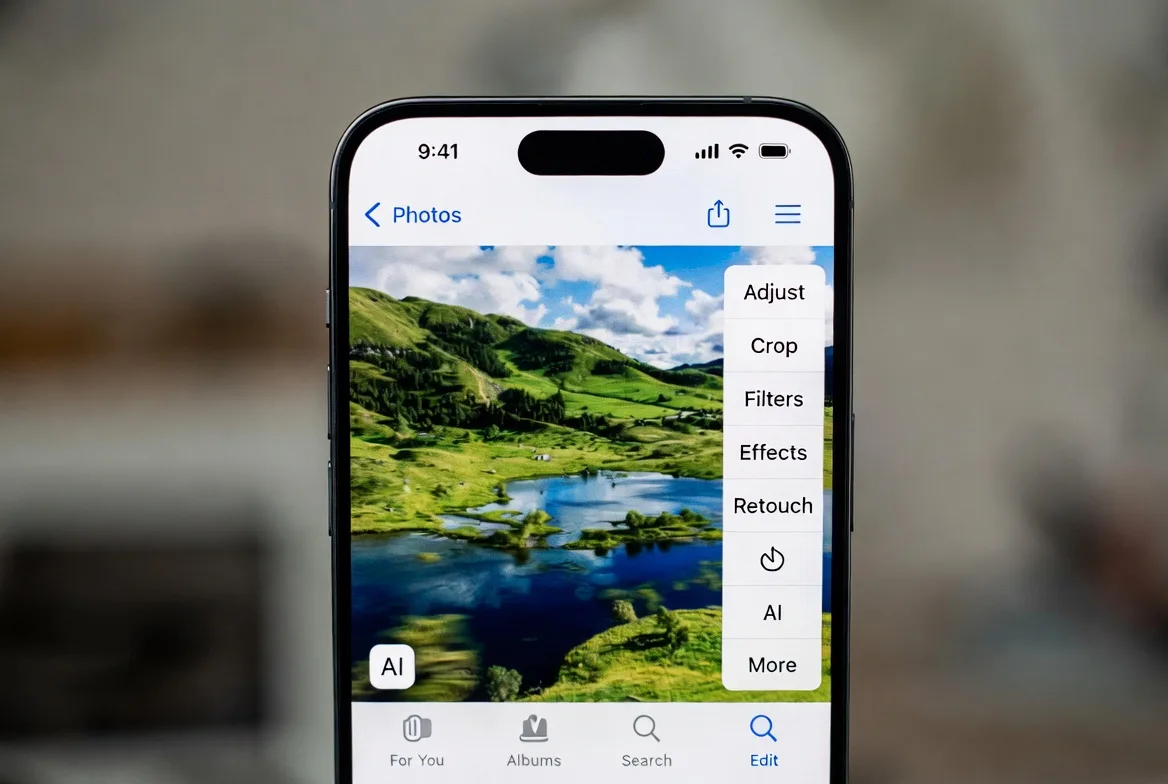
Compared to iOS 26’s Clean Up tool, these three new options provide generative and restorative capabilities that go far beyond removal. The dedicated “Apple Intelligence Tools” section in the editor creates an organized, powerful workspace.
Advantages Over Third-Party Apps:
- Seamless integration with iCloud Photos
- Consistent experience across iPhone, iPad, and Mac
- No subscription fees for core functionality
- Superior privacy protections
However, some complex edits may still benefit from dedicated software for ultimate control. Apple’s tools strike an excellent balance for the vast majority of users.

6. Device Compatibility, Release Timeline, and Setup Guide
iOS 27 is expected to support recent iPhone models, with full Apple Intelligence features requiring A17 Pro or later chips. Check Apple’s official compatibility list closer to launch for exact details.
Anticipated Release:
- WWDC announcement in June 2026
- Developer betas shortly after
- Public release in September/October 2026
To prepare:
- Ensure your iPhone is updated to the latest supported version
- Enable Apple Intelligence in Settings
- Grant Photos app necessary permissions
- Back up your library before major updates
Early adopters in the beta program will provide valuable feedback to refine these tools before wide release.
7. Broader Implications: Transforming Creativity, Productivity, and Daily Life
These three AI features represent more than photo editing upgrades. They signal Apple’s commitment to making powerful AI accessible and useful in everyday contexts.
Content creators will save hours on post-production. Families preserve memories better. Professionals gain mobile studio capabilities. The ripple effects extend to education, social sharing, and even mental wellness through improved personal photography experiences.
Privacy advocates praise the on-device focus, addressing growing concerns about data usage in AI applications. Apple’s ecosystem approach ensures these tools work harmoniously with other features like Visual Intelligence and enhanced Siri.

8. Potential Limitations and Expert Opinions
While promising, generative AI isn’t perfect. Users should review extended or reframed images for accuracy, especially in important contexts. Development challenges have been noted, suggesting possible refinements post-launch.
Photography experts welcome the tools but caution against over-reliance, encouraging users to develop fundamental skills alongside AI assistance.
“The future of mobile photography lies in intelligent augmentation rather than replacement of human creativity.” — Anonymous industry photographer commenting on Apple Intelligence
This balanced view reminds us that technology serves as an enabler for better expression.
9. Preparing for iOS 27: Tips to Maximize New AI Photo Features
- Capture high-quality source images with good lighting
- Experiment in non-critical albums first
- Combine tools creatively (Enhance then Extend)
- Use spatial photography modes where available
- Stay updated with Apple’s release notes for optimizations
Mastering these will unlock their full potential and enhance your overall iOS experience.
10. The Bigger Picture: Apple’s AI Strategy and Future Outlook
iOS 27’s photo tools are part of a larger vision where AI enhances rather than complicates daily interactions. Future updates may bring even more sophisticated capabilities, building on user feedback and hardware advancements.
As competition intensifies, Apple’s focus on privacy, integration, and usability positions it uniquely. These three features alone could justify upgrading to a compatible device for many users.
The update promises to make your iPhone camera roll not just a storage space but a creative powerhouse.
In conclusion, iOS 27’s three new AI features—Extend, Enhance, and Reframe—deliver on the promise of practical, powerful artificial intelligence. They exemplify thoughtful design that respects user privacy while pushing creative boundaries. As we await the official launch, excitement continues to build around how these tools will reshape mobile photography for millions worldwide.

This comprehensive evolution underscores Apple’s ongoing commitment to innovation that truly matters to users. Stay tuned for more details as WWDC approaches and betas roll out.
Discover more from Tech-Brunch
Subscribe to get the latest posts sent to your email.


