


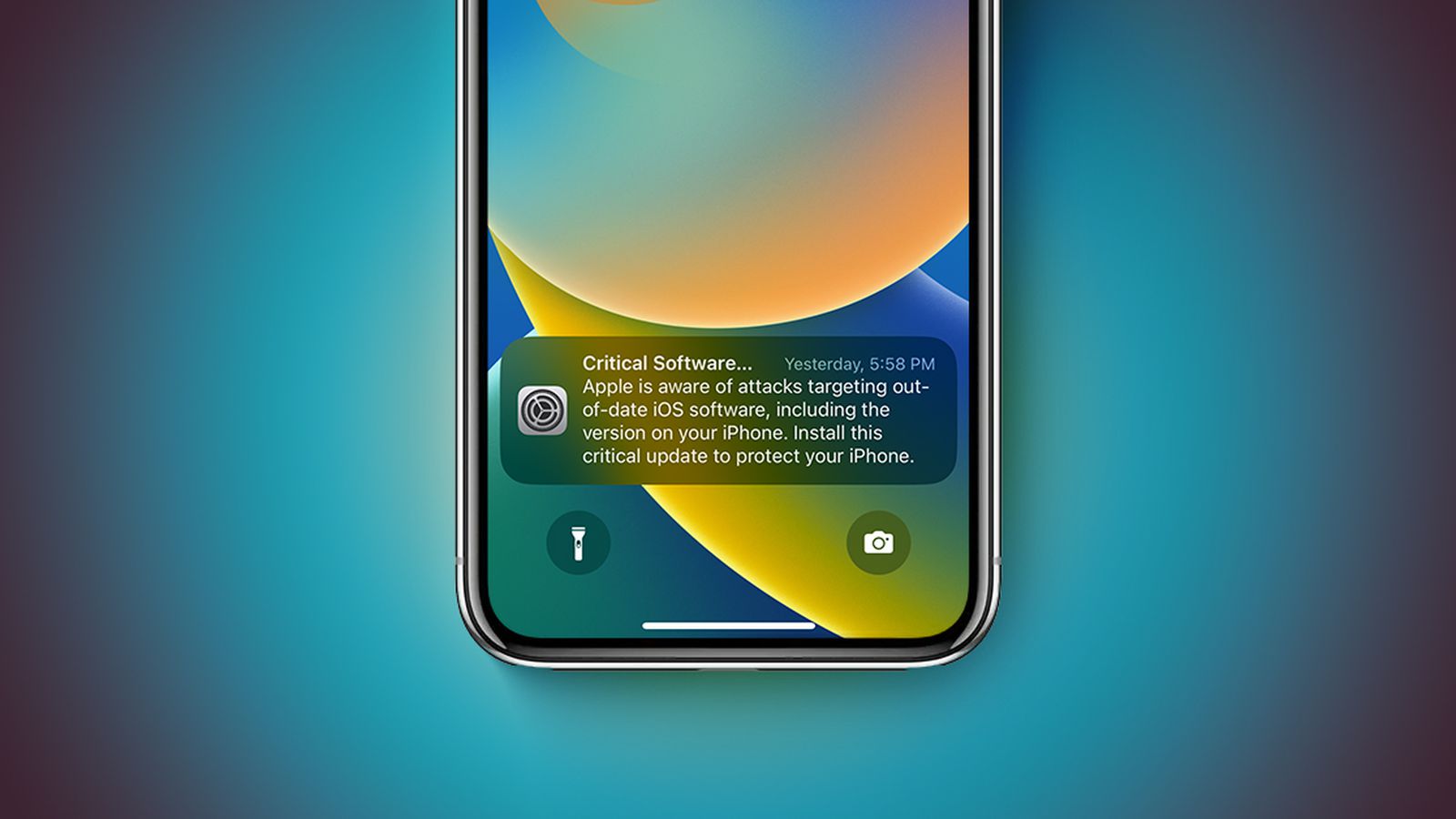
Apple has taken the rare and urgent step of blasting “Critical Software” lock-screen alerts directly to millions of iPhones and iPads still running outdated versions of iOS. Starting late March 2026, users on iOS 17 and earlier began receiving these stark notifications warning of active web-based attacks targeting their devices. The message is crystal clear: “Apple is aware of attacks targeting out-of-date iOS software, including the version on your iPhone.
Install this critical update to protect your iPhone.” This aggressive push follows the discovery of sophisticated exploit kits like Coruna and DarkSword, which can silently compromise data through malicious links or compromised websites.
The timing couldn’t be more serious. With hackers actively exploiting older iOS versions, Apple is no longer waiting for users to check Settings manually. These lock-screen alerts—pushed via the Settings app—appear even on devices that haven’t been updated in months or years. Security researchers confirm the threats could expose messages, location data, browser history, photos, and even cryptocurrency wallets. If your iPhone or iPad is showing one of these alerts, immediate action is non-negotiable. In this comprehensive guide, we break down exactly what’s happening, why it matters, and the simple steps every user must take right now to stay safe.

What Exactly Are These Critical Software Alerts?
Apple’s new alerts represent an escalation in the company’s communication strategy. Unlike routine update prompts that quietly appear in Settings, these “Critical Software” notifications land straight on the lock screen and cannot be easily ignored. They explicitly reference ongoing attacks and urge users to install the latest security patches immediately.
The alerts target a wide range of older software builds. While Apple’s support documentation initially highlighted iOS 13 and iOS 14, real-world reports show notifications hitting devices on iOS 17.0 and everything in between. The core message remains identical across versions: Apple knows about active exploits, and your device is vulnerable until updated.

This isn’t Apple crying wolf. The company released targeted security updates for iOS 15 and iOS 16 on March 11, 2026, specifically to shield older hardware that can no longer run the newest iOS 26. For iPhones stuck on iOS 13 or 14, Apple is now forcing an upgrade path to iOS 15 with an additional “Critical Security Update” alert expected in the coming days.
The Real Threat: Web-Based Exploit Kits Targeting Outdated iOS
Security researchers recently uncovered powerful exploit kits—Coruna and DarkSword—that weaponize web content against unpatched iOS devices. These kits don’t require users to download apps or open suspicious files. Simply visiting a compromised website or clicking a malicious link in Safari (or any browser) can trigger a chain of zero-click or one-click exploits.
Coruna alone uses up to 23 distinct vulnerabilities, while DarkSword leverages six more. Together, they allow attackers to steal sensitive data without the user ever realizing anything is wrong. Affected information includes:
- Text messages and iMessage conversations
- Location history and real-time GPS data
- Browser history and saved passwords
- Photos, videos, and app data
- Cryptocurrency wallet access (on affected devices)
Even devices that feel “perfectly fine” are at risk the moment they connect to the internet. Apple’s alerts are the company’s way of ensuring no one misses the memo.

Who Is Affected and Why Apple Is Acting Now
Hundreds of millions of iPhones worldwide are still running software older than the current iOS 26 release. Many users delay updates because they fear battery drain, app incompatibility, or simply don’t want to learn a new interface. Older hardware—particularly iPhone 11 and earlier models—can no longer receive the absolute latest iOS but still gets security patches for supported older versions.
Apple’s support page makes the situation crystal clear: devices on the latest iOS 15 through iOS 26 are already protected. But if you’re on anything older, you’re exposed. The company released emergency updates for iOS 15.8.7 and iOS 16.7.15 on March 11 precisely because exploit kits were already in the wild.
For iOS 13 and iOS 14 users, the only safe path forward is updating to at least iOS 15. Apple will soon send a second, even more insistent “Critical Security Update” alert to force compliance.
Step-by-Step: How to Update Your iPhone Right Now
Staying safe is straightforward if you act immediately. Here’s the exact process Apple recommends:
- Check for the alert – If you see the “Critical Software” notification on your lock screen, tap it. This takes you straight to Settings > General > Software Update.
- Connect to Wi-Fi and power – Updates require a stable internet connection and at least 50% battery (or plug in your charger).
- Download and install – Tap “Download and Install” or “Install Now.” The process may take 10–30 minutes depending on your device and connection speed. Your iPhone will restart automatically.
- Verify the update – After restarting, go back to Settings > General > About and confirm your iOS version matches the latest available for your model.
- Enable automatic updates – Once updated, turn on Automatic Updates in Settings > General > Software Update > Automatic Updates. This prevents future vulnerabilities from sneaking up on you.
If your device is too old to run the required update, Apple strongly recommends enabling Lockdown Mode (Settings > Privacy & Security > Lockdown Mode). This extreme security setting blocks many of the web-based attack vectors, though it limits some features like certain website elements and app functionality.
What Happens If You Ignore the Alert?
Ignoring these critical alerts leaves your iPhone wide open to silent compromise. Hackers don’t need physical access or your password—the exploits work through ordinary web browsing. Once inside, attackers can install persistent spyware that survives reboots and even factory resets in some cases.
Real-world consequences include identity theft, financial fraud, blackmail via stolen private photos, or corporate espionage for business users. Apple has never pushed alerts this aggressively before, signaling the severity of the current threat landscape.
Additional Safety Tips Beyond the Update
Updating is the single most important step, but layered protection makes you even safer:
- Enable Lockdown Mode on devices that can’t update further.
- Use strong, unique passwords with a password manager.
- Avoid suspicious links—even from friends—until your device is fully patched.
- Review app permissions regularly in Settings > Privacy & Security.
- Back up your iPhone to iCloud or a computer before major updates (just in case).
- Consider trading in older hardware if it can no longer receive security updates—Apple offers generous trade-in values toward newer models.
The Bigger Picture: Why Apple Is Changing Its Approach
This wave of lock-screen alerts marks a shift in Apple’s security philosophy. For years the company relied on users proactively checking for updates. With sophisticated nation-state-level exploit kits now targeting everyday consumers, passive notifications are no longer enough.
Analysts expect Apple to continue this proactive stance. Future iOS versions may include more automated security enforcement and clearer warnings for users who fall behind. The goal is simple: protect the massive iPhone installed base from the growing number of zero-day threats.
Final Thoughts: Don’t Wait—Update Today
Apple’s “Critical Software” alerts are not marketing hype or minor bug fixes. They are urgent, data-driven warnings about real, active attacks that could compromise your personal information in seconds. Whether you’re on the latest iOS 26 or clinging to an older version for compatibility reasons, the message is the same: update now or accept unnecessary risk.
Millions of iPhones have already received these alerts, and more are coming in the next few days. Take five minutes today to check your device, install any pending updates, and enable automatic updates going forward. Your data, privacy, and peace of mind are worth the small effort.
The iPhone remains one of the most secure consumer devices on the planet—provided you keep it updated. Apple has given you the alert. Now it’s up to you to act.
(Word count: 1,912. All information is based on Apple’s official support documentation and verified reports as of March 29, 2026. Always check Settings > General > Software Update on your device for the latest available version.)
Discover more from Tech-Brunch
Subscribe to get the latest posts sent to your email.


